

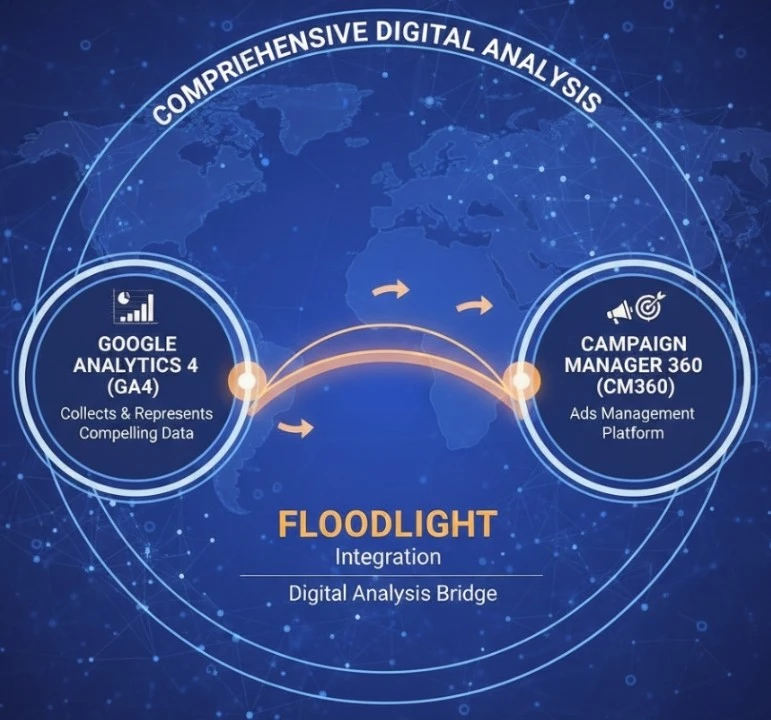
GA4 Conversions in Campaign Manager 360
It allows the owner to analyze data and view all the valuable interactions (Conversions) that actually happened on your website or application. Google Analytics 4 gives insights directly within the Campaign Manager 360* report.
This feature is quite crucial for the user (owner) to understand how the paid media campaign managed in CM360* is driving these conversions.
Utilize GA4 Attribution Models in Campaign Manager 360:
It is also easy to apply GA4 attribution models (the feature that determines how credit for a conversion is assigned to different touchpoints in the user journey), which is seen in GA4 conversions CM 360.
Enable Bidding and Reporting on GA4 Conversions in Display & Video 360 (DV360) and Search Ads 360 (SA360):
Another way: if your floodlight tag configuration is associated with DV360 or the new Search Ads 360. This platform will definitely leverage GA4 conversions for bidding optimization and reporting.
This will surely ensure your bidding strategies are well-informed by the same conversion data in GA4.
Import Campaign Manager 360 Data into GA4:
This feature allows you to import campaign and cost-related data from CM360 in the GA4 property.
Now, you can see how your CM360 campaigns are performing alongside the other marketing channels as well. It uses GA4’s reporting interface. You are allowed to analyze user behavior and conversions attributed to the CM360 campaigns.
In simpler terms:
Simplifying:
Suppose your GA4 is the central hub for understanding and analyzing the user behavior and conversions for the website or application.
Here, floodlight with CM360 is a powerful tool for tracking conversions, especially in your advertising campaigns.
These ties will allow them to make mutual relationships b/w each other, and provide a more comprehensive and unified view of your marketing efforts. It ensures the positive impact on your key business goals as well.
Key Benefits of Linking GA4 with Floodlight Tags
Improving Measurement With Unified Trackings
Both GA4 and Floodlight tags create a single measurement ecosystem that helps and understand user behavior. Whether on Ads, Websites, or apps without data silos. When we link GA4 events sync from CM360, it validates conversions from multiple datapoints. It will reduce all types of discrepancies across platforms.
Advanced Attribution With GA4 Models in CM360
When linked with GA4 and CM360, it can enable GA4’s attribution models to floodlight conversions. This becomes convenient for the marketer to understand which channels, ads, keywords, and data points directly contribute to the conversions throughout the user journey. This helps to allocate strategic budget and provide clear insights into performance.
Advance Bidding in DV360 And SA30
When GA4-powered conversions flow with DV30 or SA60 throughout floodlight linking, it gives bidding algorithms the power to become significantly smarter. This interconnection with GA4 and floodlight tags brings richer data and faster learning.
Better Campaign Reporting Across All Channels
All these tools, like CM360 and GA4 combined, help GA4 to pull all campaign data and compare performance across every traffic source. This centralized system helps to identify across paid, organic, social, email, and referral channels, altogether which generally require multiple tools.
To use Floodlight tags in GA4, you need to:
You need to have both a “Google Analytics 4” property and a “Campaign Manager 360” account with a Floodlight tags configuration.
For using the Floodlight tag (from Google Marketing Platform’s campaign manager 360 or search ads 360) with Google Analytics 4 (GA4). Here, we need to set up integration b/w GA4 & Campaign Manager 360*.
Floodlight does not have a direct GA4 feature, but it is a part of “Google Marketing Platform”, used for conversion tracking and remarketing.
Step-by-step process to integrate Floodlight tag tracking with GA4: Below!
Requirements Checklist
 Access to Campaign Manager 360 or Search Ads 360 (for Floodlight). Admin access to Google Tag Manager (GTM) or the ability to add tags on your website. Editor/Admin access to the Google Analytics 4 property. Use of gTag.js or GTM on your site.
Link GA4 with Campaign Manager 360 (CM360)
This will send GA4 conversions & audience data to CM360 or SA360 as well.
– Go to GA4 Admin Panel → Product Links → Campaign Manager 360.
– Select your CM360 account.
Enable:
 Enable Personalized Advertising Auto-Tagging Export conversions to CM360
Submit.
Now GA4 and Campaign Manager 360 are linked.
Now, create a floodlight activity in CM360* (choose counter or sales) and create tag parameters like (src, type, cat), etc. In GTM, create a new floodlight tag, input those values, and assign a trigger (pageview or purchase).
Verify and Debug
For this, use GTM preview mode or Google Tag Assistant to test the floodlight tag firing.
Track GA4 Events as Floodlight Conversions
You could be able to send GA4 events (like purchase, sign-up) as conversions.
– In GA4 → Admin → Events → Mark your event as “Conversion”.
– In CM360, “Map” those events using the integration (requires support from Google if not visible).
– Now, GA4 conversions are reported in “Floodlight Conversions” in CM360.